스플라인
길이를 따라 점이 있는 여러 개의 점 곡면을 스케치합니다.
스플라인을 스케치하려면 툴바에서 스플라인 스케치 도구를 선택합니다. 스플라인을 시작할 첫 번째 위치를 클릭합니다. 곡선이 진행될 두 번째 위치를 클릭한 다음, 계속해서 클릭해서 추가 곡선을 만듭니다. 끝나면 끝점을 두 번 클릭합니다. 그려면 스플라인이 만들어집니다.
곡선에서 점을 선택하고 곡선을 새 위치로 이동할 수 있습니다. 흰색 원을 선택해 접선 핸들을 움직여 스플라이에 대한 새로운 접선을 만들 수 있습니다. 이러한 핸들은 삭제할 수 없습니다.
단계
-
을(를) 클릭합니다. - 클릭해서 시작하고, 클릭해서 점을 설정한 다음, 두 번 클릭해서 끝냅니다.
- 스플라인을 따라 아무 점이나 클릭해서 드래그하여 조정합니다.
- 접선 핸들(흰색 점)을 사용해 스플라인 곡선의 탄젠시를 수정합니다. 접선 핸들은 삭제할 수 없습니다.
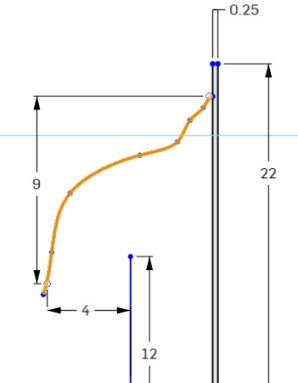
치수와 함께 스플라인 핸들(또는 임의 스플라인 점)을 사용할 수 있습니다.
구속 조건과 함께 스플라인 핸들(또는 임의 스플라인 점)을 사용할 수 있습니다.
팁
Sketch a multiple point curve with points along its length.
Steps
- Tap
to set the first point of the spline. - To set the next point of the spline, either tap
again or touch and drag to release.
To begin sketching a new spline you can either:
- Double tap to end the first spline, then tap to set the first point of a new spline.
OR
- Tap the spline tool to deselect it, then tap the spline tool to select it again and begin a new line.
Once you finish sketching a spline, with the sketch open, you can touch and drag any point along the spline to reposition it.
치수와 함께 스플라인 핸들(또는 임의 스플라인 점)을 사용할 수 있습니다.
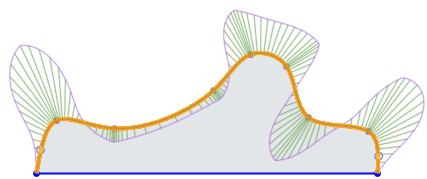
구속 조건과 함께 스플라인 핸들(또는 임의 스플라인 점)을 사용할 수 있습니다.
Sketch a multiple point curve with points along its length.
Steps
- Tap
to set the first point of the spline. - To set the next point of the spline, either tap
again or touch and drag to release.
To begin sketching a new spline you can either:
- Double tap to end the first spline, then tap to set the first point of a new spline.
OR
- Tap the spline tool to deselect it, then tap the spline tool to select it again and begin a new line.
Once you finish sketching a spline, with the sketch open, you can touch and drag any point along the spline to reposition it.
치수와 함께 스플라인 핸들(또는 임의 스플라인 점)을 사용할 수 있습니다.
구속 조건과 함께 스플라인 핸들(또는 임의 스플라인 점)을 사용할 수 있습니다.
