 도면 속성 - 형식

이용 가능 플랫폼: 도면
이 속성들은 도면의 테두리 프레임, 테두리 영역 및 타이틀 블록에서 개체 선택 기능을 활성화/비활성화합니다. 새 도면의 기본 설정은 잠김입니다. 이 경우 타이틀 블록, 테두리 또는 테두리 영역에서 개체를 즉시 선택할 수 없습니다.
 형식 탭에 액세스하기
형식 속성에 액세스하려면 도면 속성 툴바 상단의 형식 아이콘( )을 클릭합니다.
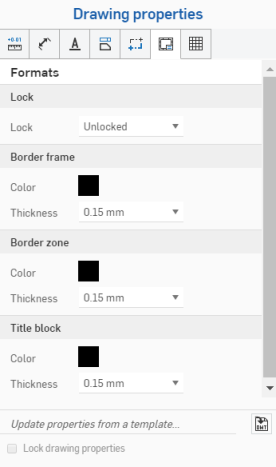
잠금
- 잠금 - 타이블 블록을 잠그거나 잠금 해제하여 편집을 허용하지 않거나 허용합니다.
도면은 처음에 이 속성을 잠금 해제됨으로 설정해야 합니다. 그래야 사용자가 타이블 블록이나 테두리의 개체를 선택할 수 있습니다.
필드 값이 변경되면 타이틀 블록이 잠겨 있을 때 타이틀 블록의 내용이 업데이트됩니다.
요소를 타이틀 블록, 테두리 또는 테두리 영역으로 이동하고 형식이 잠긴 경우, 해당 요소를 편집하려면 다시 도면으로 이동해야 합니다.
테두리 프레임
-
색상 - 도면의 내부 테두리 색상을 지정합니다.
-
두께 - 도면의 내부 테두리 두께를 지정합니다.
테두리 영역
-
색상 - 도면 테두리 영역 내부의 라벨 색상을 지정합니다.
-
두께 - 도면 테두리 영역 내부의 라벨 두께를 지정합니다.
타이틀 블록
-
색상 - 도면의 선과 타이틀 블록의 내용 색상을 지정합니다.
-
두께 - 도면의 선 두께와 타이블 블록의 내용을 지정합니다.
타이틀 블록 및 테두리 노트
타이틀 블록 및 경계에서 회색으로 된 요소는 통합문서 데이터 또는 속성에서 해당 값을 상속합니다. 그러나 해당 요소의 컨텍스트 메뉴에 액세스하려면 요소를 마우스 오른쪽 버튼으로 클릭합니다. 요소를 편집하려면 노트 편집을 선택합니다. 필드 위로 마우스를 가져가면(또는 클릭) 해당하는 속성을 확인할 수 있습니다. 필드(속성)를 삭제하고 원하는 경우 사용자 본인의 텍스트를 삽입할 수 있습니다. 다른 속성을 삽입하려면 노트 편집 상자에서 도면 속성 삽입 아이콘을 사용하십시오.
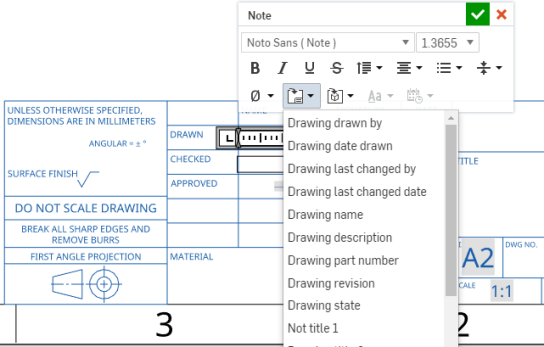
이 그림은 편집 중인 타이틀 블록의 필드(컨텍스트 메뉴에서 노트 편집 선택)와 도면 삽입 속성 명령을 통해 삽입 중인 새 필드를 보여줍니다.
도면 레이어에 대한 참고 사항
- 내보내는 동안 해당 레이어에 요소(타이틀 블록, 테두리 프레임, 또는 테두리 영역)가 추가됩니다.
- 도면 레이어는 도면의 DWT 내보내기에 포함되지 않습니다.
- 테두리 프레임, 테두리 영역, 타이틀 블록 레이어는 형식이 잠김으로 설정되면 잠깁니다.
- 테두리 프레임, 테두리 영역 및타이틀 블록 레이어는 기본 색상과 선 두께가 다를 수 있습니다.
- DWG/DXF로 내보낼 경우 테두리 프레임, 테두리 영역, 타이틀 블록 레이어의 콘텐츠는 특정 레이어(예: BORDER_FRAME, BORDER_ZONES, TITLE_BLOCK)에 배치됩니다.
- 이전 버전의 DWG/DXF 형식은 레이어를 완전히 지원하지 않을 수 있다는 점에 유의하십시오.
- 도면 시트 크기가 변경되어도 타이틀 블록은 바뀌지 않습니다. 하지만 테두리 프레임과 테두리 영역은 더 크거나 작은 크기 또는 더 많거나 적은 영역으로 다시 그려집니다.
- 도면 레이어의 모든 내용은 시트 크기 변경이나 시트 서식 대체 시 절대 바뀌지 않습니다.