フィット、ウィンドウを拡大、選択を拡大


利用可能: Part Studio、アセンブリ
[フィット]、[ウィンドウを拡大]、[選択を拡大] を使用して、グラフィック領域内の現在のモデルの表示を、それぞれ画面、選択した境界ボックス、または選択に合わせて調整します。
 拡大オプション
拡大のマウスホイールの方向は、ユーザーアカウントの環境設定で構成できます。
拡大するには、[カメラとレンダリングのオプション] を選択し、次のオプションのいずれかを選択します。
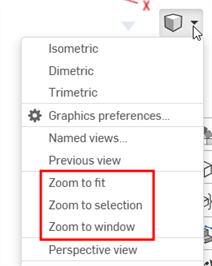
- フィットにズーム (ショートカット: f、スクロールホイールをダブルクリック) - このコマンドを選択するか、ショートカットキーを使用して Part Studio、アセンブリ、または図面全体をズームします。
- ウィンドウにズーム (ショートカット: w) - このコマンドを選択し、Part Studio、アセンブリ、または図面内で、ズームする領域を囲むボックスをクリックしてドラッグします。ショートカットキーを使用すると、フィーチャーのオン/オフが切り替わります。
- 選択をズーム - このコマンドを選択すると、選択したエンティティにズームします。このオプションを表示するには、エンティティを選択する必要があります。
[ウィンドウを拡大] と [選択を拡大] は、iOS または Android プラットフォームでは使用できません。
選択を拡大
[選択を拡大] を使用して、選択したエンティティのクローズアップにビューを変更します。
グラフィック領域で選択します。
![[選択を拡大] 機能を使用する](../Resources/Images/concepts/zoomtoselection2.png)
[ビュー] メニューを展開し、[選択を拡大] を選択します。
![[選択を拡大] 機能で拡大した後を示す例](../Resources/Images/concepts/zoomtoselection3.png)