高画質で表示

利用可能: Part Studio、アセンブリ
Shift+R
現在アクティブな Part Studio またはアセンブリに対して、使用可能な最高品質のテッセレーションビューを選択/選択解除します。これにより、パフォーマンスがわずかに低下する可能性があることに注意してください。
 手順
手順
-
[カメラとレンダリングのオプション] を選択し、次に [高画質で表示] を選択します。
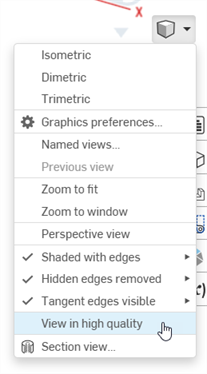
-
このオプションをオンにすると、以下のように青色の通知が表示されます。
![[高品質で表示] オプションの使用例](../Resources/Images/concepts/high-quality-view-enabled.png)
この表示モードがパフォーマンスに与える影響について詳しくは、高品質モードを参照してください。