


利用可能: スケッチ
線または円弧の中点に点を拘束します。
選択中に拘束をオンに切り替えます。選択したエンティティの各ペアは互いに拘束されます。クリックしてオフに切り替えるか、別のツールを選択して自動的にオフに切り替えます。
ショートカット: Shift+M
 手順
手順
- 線と点を選択するか、円弧と点を選択します。
- 中点アイコン (
 ) をクリックします。
点は、線または円弧の中点に拘束されます。
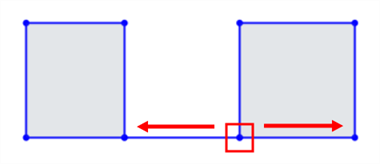
線上の他の 2 点の中点に点を配置するには、次の手順を行います。
-
始点を選択します。
-
終点を選択します。
-
始点と終点の間の点 (中点) を選択します。
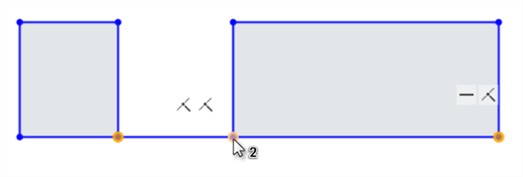
最初に始点 (左) と終点 (右) を選択し、次に中点 (カーソルの下に表示) を選択します。
-
ツールバーの中点アイコン (
) をクリックします。
3 番目の点は、始点と終点の間が等距離になるよう拘束されます。
詳細は、ラーニングセンターコースのスケッチ入門 (Onshape アカウントが必要です) を参照してください。