コンテキストメニュー


エンティティまたは空白領域を右マウスボタン (RMB) でクリックすると、コンテキストメニューが表示されます。コンテキストメニューには、現在のコンテキストでそのエンティティまたはワークスペースのコマンドが含まれています。コンテキストメニューは、グラフィック領域の図形、フィーチャーリスト、パーツリスト、図面、およびタブなどの Onshape の構成に用意されています。インターフェイス全体を右クリックすると、コンテキストメニューが表示されます。
モバイルデバイスでコンテキストメニューを表示するには、グラフィック領域を 2 本指でタップします。iOS デバイスでは、Apple Pencil でグラフィック領域をダブルタップしてコンテキストメニューを表示することもできます。
 コンテキストメニューの使用
コンテキストメニューにアクセスする状況には、次のようなものがあります。
- フィーチャーまたはスケッチを編集のために開いている場合
- エンティティがグラフィック領域または図面領域で選択されている場合
- フィーチャーリスト、パーツリストなどで選択します。
- In the graphics area of both Part Studio and Assembly:
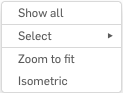
- Show all - Show all parts, sketches, and planes
- Show all parts - Show all parts, even those that have been hidden
- Create selection - Open the Create selection dialog for selecting a group of entities to use as a selection in another dialog
- Zoom to fit - Zoom the view of the graphics area to display all entities within view
- Isometric - Adjust the view to Isometric
たとえば、フィーチャーリストでスケッチを選択すると、コンテキストメニューには次のオプションが表示されます。
-
名前を変更 - 名前を編集するか、スケッチに新しい名前を付けます
-
編集 - スケッチを開いて編集します
-
スケッチをコピー- 1 つの Part Studio から別の Part Studio にスケッチをコピーする:
- フィーチャーリストでスケッチを選択し、コンテキストメニューから [スケッチをコピーする] を選択します。
- 別の Part Studio で、フィーチャーリストから平面を選択し、コンテキストメニューから [スケッチを貼り付ける] を選択します。
異なるバージョンの Part Studio 間でスケッチをコピーして貼り付けると、エラー状態になる場合があります。
- 寸法を表示する - スケッチの寸法を表示します。グラフィック領域の別の場所をクリックすると、寸法が再び非表示になります。
- フォルダに選択を追加 - 選択したスケッチをフォルダに追加します。
- 表示/非表示 - 選択したスケッチを表示または非表示にします。
- [スケッチの図面を作成]-選択したスケッチのために選択したテンプレートを使用して [図面] タブを作成します。
- DXF/DWG としてエクスポートする - 選択したスケッチを .DXF ファイルまたは .DWG ファイルとして (ローカルドライブに) エクスポートします。
- 抑制 - 選択したフィーチャーを表示せずにモデルを可視化します。
- コメントを追加 - そのスケッチにコメントを直接追加する
- 選択を拡大 - 現在選択しているエンティティが画面全体に表示されるように拡大します。
- に垂直に表示 - 現在選択しているスケッチに対して垂直に表示します。
- 選択解除 - 現在選択しているエンティティすべての選択を取り消します。
- ここまでロールする - フィーチャーリストを選択したスケッチにロールします。
- 削除 - 選択したスケッチをフィーチャーリストから削除します。
例
以下の図は、コンテキストメニューと何も選択されていない使用可能なアクションを示しています。
次の図は、コンテキストメニューと、トップ平面のみを選択した場合に使用可能なアクションを示しています。
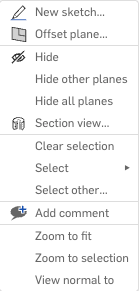
新規スケッチ (選択した平面でスケッチを開始) やオフセット平面などの作成コマンドには、メニューで適切なアイコンが横に表示されます。
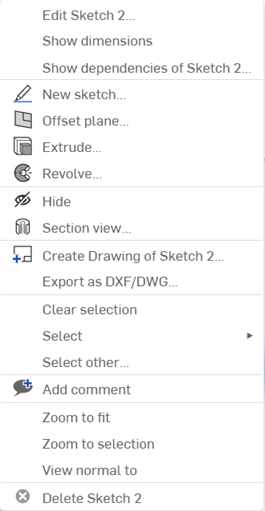
注記
- コンテキストメニューは、垂直方向に異なるセクションで構成されています。コンテキストメニューは状況依存で、使用可能なオプションは、そのメニューを開いたときに選択した内容によって異なります。
- コンテキストメニューには、必ずしも同じセクションがすべて表示されるとは限りません。代わりに、ドキュメント内の選択内容に基づいて関連するセクションのみが表示されます。