 図面のプロパティ - 形式

利用可能: 図面
これらのプロパティは、図面の境界フレーム、境界ゾーン、タイトルブロックのオブジェクトの有効と無効を切り替えます。新しい図面の既定は [ロック] です。タイトルブロック、境界、境界ゾーン内のオブジェクトをすぐに選択することはできません。
 [形式] タブへのアクセス
[形式] プロパティにアクセスするには、[図面のプロパティ] ツールバーの上部にある形式アイコン ( ) をクリックします。
![[図面のプロパティ] パネル、[形式] タブ](../Resources/Images/feature-tools/formats_menu.png)
ロック
- ロック済み - タイトルブロックをロックまたはロック解除して、編集を禁止したり編集できるようにしたりします。
図面では、このプロパティを既定でロック解除に設定し、ユーザーがタイトルブロックや境界内のオブジェクトを選択できるようにする必要があります。
フィールド値を変更すると、タイトルブロックがロックされた際に、タイトルブロックの内容が更新されます。
エンティティをタイトルブロック、境界、または境界ゾーンに移動し、[形式] がロックされている場合は、図面を編集するためにエンティティを [図面] に戻す必要があります。
境界フレーム
-
色 - 図面の内側の境界の色を指定します。
-
厚さ - 図面の内側の境界の太さを指定します。
境界ゾーン
-
色 - 図面の境界ゾーンの内側のラベルの色を指定します。
-
厚さ - 図面の境界ゾーンの内側のラベルの太さを指定します。
タイトルブロック
-
色 - 図面の線とタイトルブロックの内容の色を指定します。
-
厚さ - 図面の線とタイトルブロックの内容の太さを指定します。
タイトルブロックと境界の注記
タイトルブロックと境界では、グレーのエンティティは、ドキュメントデータまたはプロパティの値を継承します。ただし、エンティティを右クリックしてメニューにアクセスし、[注記を編集] を選択してエンティティを編集できます。フィールドにカーソルを合わせるかクリックすると、対応するプロパティが何であるかを確認できます。必要に応じて、フィールド (プロパティ) を削除し、独自のテキストを挿入できます。[注記を編集] ボックスの [図面プロパティを挿入] アイコンを使用して、別のプロパティを挿入します。
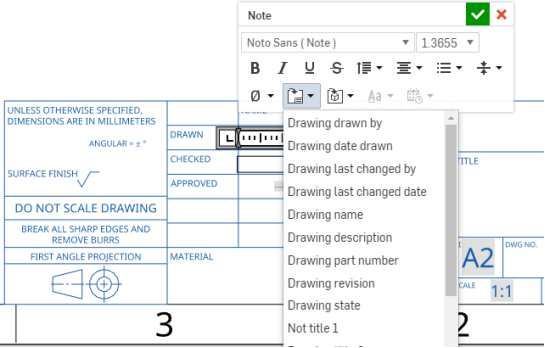
この図は、編集中のタイトルブロックのフィールド (コンテキストメニューから [注記を編集] を選択) と、[図面プロパティを挿入] コマンドを使用して挿入される新しいフィールドを示しています。
図面レイヤーに関する注意事項
- エクスポート中に、対応するレイヤー (タイトルブロック、境界フレーム、または境界ゾーン) に要素が追加されます。
- 図面レイヤーは、図面の DWT エクスポートには含まれません。
- 形式が [ロック] に設定されている場合、[境界フレーム]、[境界ゾーン]、[タイトルブロック] の各レイヤーはロックされます。
- [境界フレーム]、[境界ゾーン]、[タイトルブロック] のレイヤーは、異なる色と線の太さを既定に設定できます。
- [境界フレーム]、[境界ゾーン]、[タイトルブロック] のレイヤーのコンテンツは、DWG/DXF にエクスポートすると、特定のレイヤー (BORDER_FRAME、BORDER_ZONES、TITLE_BLOCK など) に配置されます。
- DWG/DXF 形式の古いバージョンは、レイヤーを完全にサポートしていない場合があることに注意してください。
- 図面シートのサイズを変更しても、タイトルブロックは置き換えられません。ただし、境界フレームと境界ゾーンは、サイズが大きくなったり小さくなったり、ゾーンが増えたり少なくなったりすると、再描画されます。
- 図面レイヤーのすべてのコンテンツは、シートサイズの変更やシート形式の置換によって置き換えられることはありません。