 ドキュメントの注記

テキスト、Markdown、ハイパーリンクを [ドキュメントの注記] パネルに追加します。

 Video example
Video transcript
Document notes are text stored in an Onshape document that can capture important instructional or descriptive document information and support Markdown formatting and hyperlinks.
Open the document notes panel, then click Edit notes to open the Document notes editor.
Enter text in the panel. Click Show preview to see how the note appears once changes are applied.
Document notes support Markdown formatting. For example, a single pound sign creates a Heading one. Two pound signs create a Heading two. Three pound signs create a Heading three.
A single asterisk makes text italic, a double asterisk makes text bold, and a triple asterisk makes the text both bold and italic.
Hyphens and single asterisks create bulleted lists, while numbers followed by a period create numbered lists.
Hyperlinks are created using brackets for the display text and parentheses for the URL.
Click Apply to save the note.
Click Refresh notes to load the latest version of the Document Notes.
手順
-
[ドキュメント] パネルのドキュメントの注記アイコン (
 ) をクリックして、[ドキュメントの注記] パネルを開きます。
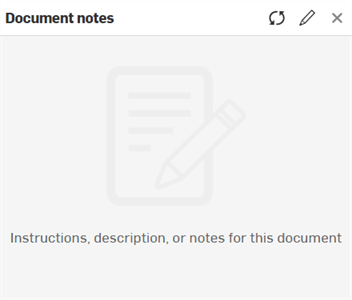
パネルの右上には、次の 3 つのオプションが表示されます。
-
注記を更新 (
 ) - [ドキュメントの注記] パネルを更新して最新の注記を表示します。
-
注記の編集 (
 ) - [ドキュメントの注記] エディタを開きます
-
Close (X) - Closes the Document notes panel.
-
-
注記の編集アイコン (
) をクリックして [ドキュメントの注記] エディタを開き、必要に応じて現在のドキュメントに関連するテキスト、マークアップ、またはハイパーリンクを入力します。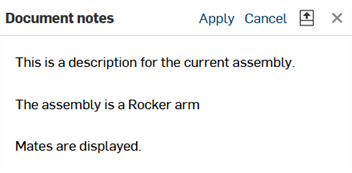
ドキュメントの注記の編集中は、パネルの右上から次のオプションを使用できます。
-
適用 - 更新された注記をドキュメントの注記に適用します。
-
キャンセル - 更新された注記の適用をキャンセルします。ドキュメントの注記が閉じ、[ドキュメントの注記] メインパネルに戻ります。
-
プレビュー (
 ) - ドキュメントの注記のプレビューを表示します。
-
Close (X) - Closes the Document notes' edit panel. You are taken back to the Document notes main panel.
-
-
プレビューアイコン (
) をクリックすると、書き込まれたドキュメントの注記のプレビューがパネルの下半分に表示されます。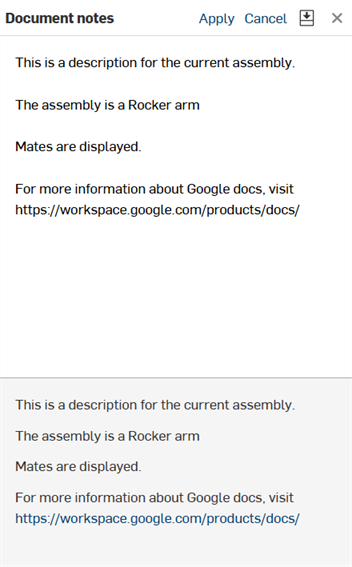
-
ドキュメントの注記を書き終わったら、[適用] をクリックして最新の編集内容で注記を更新します。
-
必要に応じて X をクリックして [ドキュメントの注記] パネルを閉じます。
ドキュメントの注記に Markdown を含める
[ドキュメントの注記] パネルでは従来の Markdown を使用できます。以下は、Markdown 形式の例を示しています。
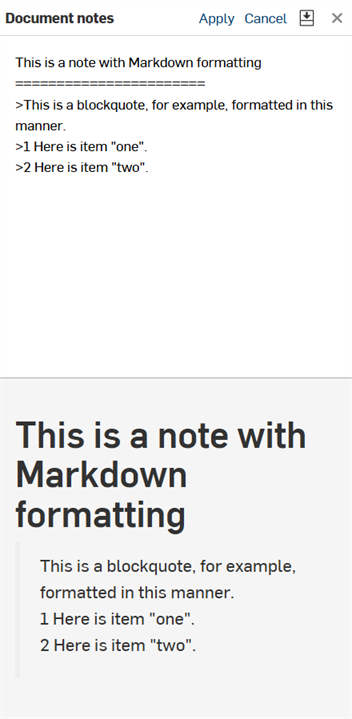
[ドキュメントの注記] パネルで使用できる Markdown 形式の概要は以下のとおりです。
-
見出し 1 の形式は次のとおりです。
                Heading 1

============ -
見出し 2 の形式は次のとおりです。
                Heading 2

-------------- -
# This is also a heading 1 -
## This is a heading 2 -
###### This is a heading 6 -
# This is also a heading 1# -
## This is also a heading 2## -
### This is also a heading 3### -
ブロック引用符を使用する段落は次のようになります。
-
> This is a blockquote with two paragraphs. You can format it this way,> and it will display appropriately.> Markdown is very versatile.>> This is the second paragraph within a blockquote.> Markdown is very versatile. -
> This is a also blockquote with two paragraphs. Showing another wayto format with Markdown.> Another section would appear here.
-
-
ブロック引用符には、ヘッダー、リスト、コードブロックなど、他の Markdown 要素を含めることができます。
> ## This is a header.>> 1. This is the first list item.> 2. This is the second list item.>> Here's some example code:>> return shell_exec("echo $input | $markdown_script"); -
Markdown は、順序付き (番号付き) リストと順序なし (箇条書き) リストをサポートしています。
-
順序なしのリストでは、アスタリスク、プラス、ハイフンを同じ意味でリストマーカーとして使用します。
* Red* Green* Blue以下と同等
+ Red+ Green+ Blueおよび:
- Red- Green- Blue -
番号付きリストでは、数字の後にピリオドが続きます。
1. First priority2. Second priority3. Third priority