 Flow

Disponibile in: Schizzo
Create flow continuous transitions (G3) between sketch splines (and conics) and surrounding geometry. Position, tangency, curvature, and the rate of change of curvature all match where the curves join. Use Flow when you need a smoother transition than Curvature provides, for example on aesthetic surfaces or motion paths.
Attiva i vincoli mentre effettui le selezioni. Ogni coppia di entità selezionata è vincolata l'una all'altra. Fai clic per disattivarla o seleziona un altro strumento per disattivarla automaticamente.
 Passaggi
To make two curves G3 (flow) continuous, do either of the following:
- Select the two curves, and then click
the Flow icon (
 ).
- Click
the Flow icon ( ), and then select the two curves.
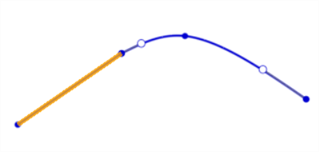
Before using the Flow constraint (line in yellow, spline in blue)
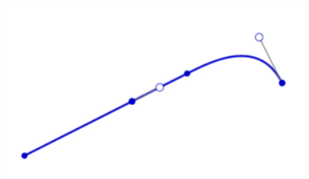
After using the Flow constraint
Note
- One of the two curves must be a spline or conic with enough control points to satisfy the constraint.
- You can constrain two curves in the current sketch, or a curve in the current sketch and an external edge.
- Flow cannot be applied to an offset spline.
- Flow constraints are listed in the Constraint manager as Flow 1, Flow 2, and so on.
Consulta il corso del Learning Center Introduzione alla creazione di schizzi (è richiesto un account Onshape) per ulteriori informazioni.