Modificateurs d'apparence

Disponible uniquement pour.
Disponible dans : Render Studio
Les modificateurs constituent un type particulier d'apparence utilisé pour modifier d'autres apparences. Ces modificateurs ne remplacent pas l'apparence précédente. Leur rôle consiste plutôt à être associés au paramètre Matériau de base de la nouvelle apparence du modificateur.
Pour appliquer un modificateur d'apparence, faites glisser et déposez un modificateur d'apparence sur la pièce ou la face de la scène, ou faites-le glisser sur le paramètre Apparence du volet.
Pour remplacer l'apparence précédente par la nouvelle apparence du modificateur, sélectionnez la pièce ou la face de la pièce dans la liste des scènes ou la zone graphique, cliquez avec le bouton droit sur la vignette d'apparence du modificateur dans la bibliothèque des apparences et sélectionnez Attribuer dans le menu contextuel.
Tous les modificateurs se trouvent dans le dossier Modifiers de niveau supérieur. En outre, les modificateurs sont indiqués par une icône de modification ( ) dans le coin supérieur gauche de la vignette Apparence :
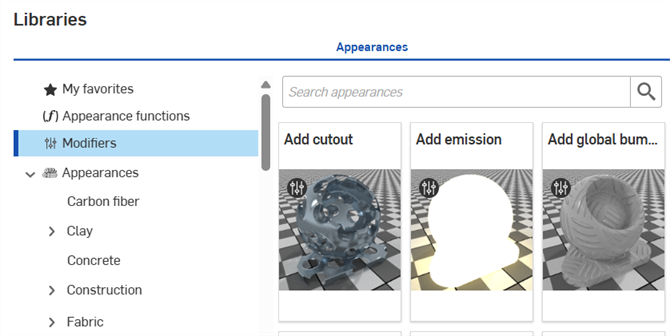
 Tableau des modificateurs d'apparence
Le tableau suivant présente tous les modificateurs d'apparence de la bibliothèque des apparences :
| Dossier Apparence | Nom de l'apparence | Sous-titre du nom de l'apparence | Description de l'apparence |
| Modificateur | Ajouter des coins arrondis | [N/A] | Ajoute des coins arrondis aux arêtes des pièces, préservant ainsi leur apparence de base. Appliquez une nouvelle apparence de base. Arrondissez les différentes apparences. Réglez les paramètres de rayon et d'arrondi. |
| Modificateur | Ajouter de la brillance | [N/A] | Ajoute une couche de brillance à une pièce ou à une face, tout en conservant l'aspect de base. Appliquez un nouvel aspect de base et une nouvelle normale de brillance. Réglez les paramètres de teinte multiscalaire de brillance, de rugosité de brillance, de couleur de brillance et de poids de brillance. |
| Modificateur | Ajouter du volume | [N/A] | Ajoutez des propriétés de volume à une pièce/face, tout en préservant son apparence de base. Appliquez une nouvelle apparence de base. Ajustez les paramètres du coefficient d'absorption, du biais directionnel et du coefficient de diffusion. |
| Modificateur | Ensemble d'apparences (Render Studio Advanced) | [N/A] | Permet d'assigner un ensemble d'apparences à des entités. Passer d'une apparence à l'autre au sein de cet ensemble constitue un moyen simple et rapide d'expérimenter différentes variations d'apparence. |
| Modificateur | Recto-verso | [N/A] | Ajoute des apparences sur le devant et à l'arrière d'une face. Appliquez une apparence sur le devant et une autre à l'arrière. Les apparences doivent obligatoirement avoir des parois minces. La transmission des deux apparences doit correspondre. Ajustez le paramètre de découpe, commun aux deux côtés, pour déterminer où les faces sont visibles. |
| Modificateur | Ajouter un placage de relief global | [N/A] | Modifiez une apparence en appliquant un placage de relief global à une pièce/face. Le placage de relief local du paramètre du matériau de base est préservé. |
| Modificateur | Appliquez un revêtement transparent | [N/A] | Appliquez un revêtement transparent sur une pièce/face, tout en conservant l'aspect de base. Appliquez un nouvel aspect de base. Réglez les paramètres de couleur du filtre de revêtement, ior, reliefs, rugosité des reflets et visibilité du revêtement. |
| Modificateur | Appliquer une atténuation de couleur | [N/A] | Modifiez l'atténuation des couleurs d'apparence pour qu'elle dépende de la vue. Appliquez le modificateur à une pièce/face. 5 options d'atténuation des couleurs sont proposées pour ombrer la pièce/face, de la couleur 1 (direction d'orientation) à la couleur 5 (bords de la pièce/surface). Ajustez le matériau de base et les 5 paramètres de couleur. |
| Modificateur | Appliquer un voile de poussière | [N/A] | Appliquez un voile diffus de poussière ou d'impuretés sur une pièce/face, tout en conservant l'aspect de base. Appliquez un nouvel aspect de base. Ajustez les paramètres de couleur, de quantité, de relief et de densité de la poussière. |
| Modificateur | Appliquer un revêtement à paillettes | [N/A] | Appliquez une couche de paillettes métalliques sur une pièce/face, tout en conservant l'aspect de base. Appliquez un nouvel aspect de base. Ajustez les paramètres suivants : quantité de paillettes, orientation aléatoire des paillettes, couleur, opacité des paillettes, rugosité et taille des paillettes. |
| Modificateur | Appliquer un film mince | [N/A] | Appliquez un film mince sur une pièce/face, tout en conservant l'aspect de base. Appliquez un nouvel aspect de base. Ajustez les paramètres d'ior et d'épaisseur. |
| Modificateur | Mélangeur de surface | [N/A] | Modifiez les caractéristiques de mélange de surface de 2 apparences. Appliquez le modificateur à la pièce/face. L'apparence actuelle est préservée. Ajustez le matériau de base (apparence actuelle) et le matériau de mélange (appliquez une nouvelle apparence), et la pondération du mélange pour masquer le matériau de mélange. |
| Modificateur | Atténuation de surface | [N/A] | Modifiez les caractéristiques de mélange de surface de 2 apparences. Appliquez le modificateur à la pièce/face. L'apparence actuelle est préservée. Ajustez le matériau de base (apparence actuelle) et le matériau de mélange (appliquer une nouvelle apparence), le biais de mélange, la pondération de mélange des arêtes et la pondération de mélange des faces. |
| Modifier, Général | Ajouter une superposition d'autocollants | [N/A] | Modifiez l'apparence en superposant un autocollant diélectrique sur la pièce/face. Nécessite un fichier image de masque pour définir les autocollants. |
| Modificateur, éclairage | Add emission | [N/A] | Modifiez une apparence en appliquant une émission, tout en préservant l'apparence de base. Appliquez une nouvelle apparence de base. Réglez l'intensité, la couleur, l'unité d'émission et les paramètres d'échelle des unités. |
| Modificateur, éclairage | Add thermal emission | [N/A] | Modifiez l'apparence en appliquant une émission de chaleur à la pièce/face. Réglez le matériau de base, l'intensité, la température (modifie la couleur) et l'unité pour les paramètres d'émission. |
| Modificateur, métal | Appliquer un mince revêtement métallique | [N/A] | Appliquez un revêtement métallique sur une pièce/face en préservant l'apparence de base. Appliquez une nouvelle apparence de base. Réglez les paramètres de couleur de réflexion, de reliefs, de rugosité de réflexion et de degré de réflexion. |
| Modificateur, plastique>Maille, Métal>Maille | Ajouter une découpe | [N/A] | Modifiez l'apparence d'une pièce/face en y appliquant des découpes. Force le matériau à présenter des parois minces. Utilisé pour modéliser des feuilles, de l'herbe ou une clôture. Nécessite un fichier image de masque pour définir les découpes. |