Onshape Default Tolerances Library

Available in: Part Studio
The Onshape Default tolerances library content is created by Onshape, kept in documents within Onshape, and maintained by Onshape. There is never any risk of this content disappearing or not working from one release to another. A time-saving process is integrated in this workflow to simplify applying common default tolerances to parts.
-
To apply these tolerances to your parts in Onshape, see Using a tolerance from the default tolerances library.
-
To create your own custom Default tolerances library, see Default tolerances library.
-
To use the Onshape Default tolerances library as a starting point for your own library, see Copying Onshape Default tolerances into a document below.
 Onshape Default tolerances table
The following table outlines the tolerances found in the Onshape default tolerances library:
| Type | Default tolerances | Tolerances |
| ISO-2768-1 | ISO 2768-c |
Linear tolerances Up to 0.05 cm Up to 0.3 cm ±0.02 cm Up to 0.6 cm ±0.03 cm Up to 3 cm ±0.05 cm Up to 12 cm ±0.08 cm Up to 40 cm ±0.12 cm Up to 100 cm ±0.2 cm Up to 200 cm ±0.3 cm Up to 400 cm ±0.4 cm |
|
Angular tolerances Up to 1 cm ±1.5° Up to 5 cm ±1° Up to 12 cm ±0.5° Up to 40 cm ±0.25° Over 40 cm ±0.167° |
||
|
Chamfer distances Up to 0.05 cm Up to 0.3 cm ±0.04 cm Up to 0.6 cm ±0.1 cm Over 0.6 cm ±0.2 cm |
||
|
Fillet radii Up to 0.05 cm Up to 0.3 cm ±0.04 cm Up to 0.6 cm ±0.1 cm Over 0.6 cm ±0.2 cm |
||
| ISO 2768-f |
Linear tolerances Up to 0.05 cm Up to 0.3 cm ±0.005 cm Up to 0.6 cm ±0.005 cm Up to 3 cm ±0.01 cm Up to 12 cm ±0.015 cm Up to 40 cm ±0.02 cm Up to 100 cm ±0.03 cm Up to 200 cm ±0.05 cm |
|
|
Angular tolerances Up to 1 cm ±1° Up to 5 cm ±0.5° Up to 12 cm ±0.333° Up to 40 cm ±0.167° Over 40 cm ±0.083° |
||
|
Chamfer distances Up to 0.05 cm Up to 0.3 cm ±0.02 cm Up to 0.6 cm ±0.05 cm Over 0.6 cm ±0.1 cm |
||
|
Fillet radii Up to 0.05 cm Up to 0.3 cm ±0.02 cm Up to 0.6 cm ±0.05 cm Over 0.6 cm ±0.1 cm |
||
| ISO 2768-m |
Linear tolerances Up to 0.05 cm Up to 0.3 cm ±0.01 cm Up to 0.6 cm ±0.01 cm Up to 3 cm ±0.02 cm Up to 12 cm ±0.03 cm Up to 40 cm ±0.05 cm Up to 100 cm ±0.08 cm Up to 200 cm ±0.12 cm Up to 400 cm ±0.2 cm |
|
|
Angular tolerances Up to 1 cm ±1° Up to 5 cm ±0.5° Up to 12 cm ±0.333° Up to 40 cm ±0.167° Over 40 cm ±0.083° |
||
|
Chamfer distances Up to 0.05 cm Up to 0.3 cm ±0.02 cm Up to 0.6 cm ±0.05 cm Over 0.6 cm ±0.1 cm |
||
|
Fillet radii Up to 0.05 cm Up to 0.3 cm ±0.02 cm Up to 0.6 cm ±0.05 cm Over 0.6 cm ±0.1 cm |
||
| ISO 2768-v |
Linear tolerances Up to 0.05 cm Up to 0.3 cm Up to 0.6 cm ±0.05 cm Up to 3 cm ±0.1 cm Up to 12 cm ±0.15 cm Up to 40 cm ±0.25 cm Up to 100 cm ±0.4 cm Up to 200 cm ±0.6 cm Up to 400 cm ±0.8 cm |
|
|
Angular tolerances Up to 1 cm ±3° Up to 5 cm ±2° Up to 12 cm ±1° Up to 40 cm ±0.5° Over 40 cm ±0.333° |
||
|
Chamfer distances Up to 0.05 cm Up to 0.3 cm ±0.04 cm Up to 0.6 cm ±0.1 cm Over 0.6 cm ±0.2 cm |
||
|
Fillet radii Up to 0.05 cm Up to 0.3 cm ±0.04 cm Up to 0.6 cm ±0.1 cm Over 0.6 cm ±0.2 cm |
||
| Precision |
Linear tolerances Default 0.013 cm X.XX ±0.03 cm X.XXX ±0.013 cm X.XXXX ±0.0013 cm |
|
|
Angular tolerances ±1° |
||
|
Chamfer angles ±5° |
Copying Onshape Default tolerances into a document
The Onshape Default tolerances library are a group of specifications; each on their own Variable Studio tab. To copy any of these tabs to your own document to be used as a starting point for your own Default tolerances library:
-
Navigate to the ISO 2768-1 document.
-
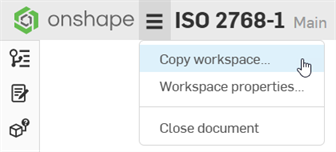
Click the Make a copy to edit button at the top of the document (first image below) or click Copy workspace from the Document toolbar menu (second image below):

-
Copy the active workspace to a new document location (and provide an alternate name, if required). Then click Copy here.
-
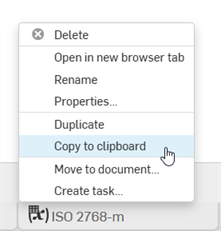
Right-click on the ISO-2768 tab to be copied and select Copy to clipboard:
-
Open the document in which to paste the Default tolerances, click the Insert new tab icon (
 ), and select Paste tab.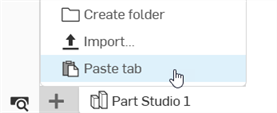
-
From a document that has a model with at least one tolerance applied, click to open the Inspection table (
 ).
). -
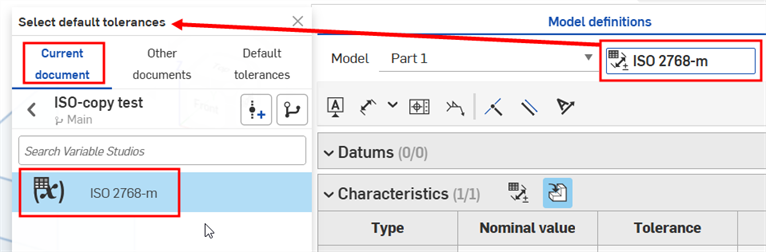
Click the Select default tolerances (
 ) button.
 -
In the Select default tolerances dialog, select Current document. The Default tolerances from the pasted Variable Studio is located in this list and can be selected for use:
See Step 9: Editing a Default tolerance library for information on how to Edit the tolerances once they are selected.