 Flow

Available in: Sketch
Create flow continuous transitions (G3) between sketch splines (and conics) and surrounding geometry. Position, tangency, curvature, and the rate of change of curvature all match where the curves join. Use Flow when you need a smoother transition than Curvature provides, for example on aesthetic surfaces or motion paths.
Zwangsbedingungen können Sie mit der Umschaltfunktion ein- oder ausschalten, während Sie etwas auswählen: Wenn Sie auf „Symmetrisch“ klicken, werden alle ausgewählten Elemente zueinander symmetrisch angeordnet. Wenn Sie erneut auf „Symmetrisch“ klicken oder ein anderes Tool auswählen, wird die Option wieder ausgeschaltet.
 Steps
To make two curves G3 (flow) continuous, do either of the following:
- Select the two curves, and then click the Flow icon (
 ).
- Click the Flow icon ( ), and then select the two curves.
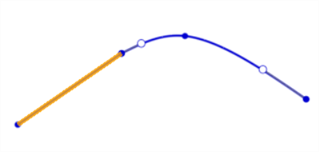
Before using the Flow constraint (line in yellow, spline in blue)
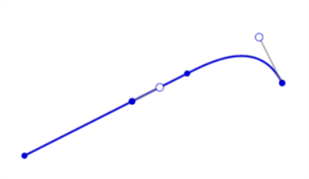
After using the Flow constraint
Notes
- One of the two curves must be a spline or conic with enough control points to satisfy the constraint.
- You can constrain two curves in the current sketch, or a curve in the current sketch and an external edge.
- Flow cannot be applied to an offset spline.
- Flow constraints are listed in the Constraint manager as Flow 1, Flow 2, and so on.
Weitere Informationen finden Sie im Learning-Center-Kurs Einführung zur Skizzenerstellung (Onshape-Konto erforderlich).