Aussehen-Modifikatoren

Nur verfügbar für
Verfügbar in: Render Studios
Modifikatoren sind eine spezielle Art von Aussehen, mit denen Sie andere Aussehen anpassen können. Diese Modifikatoren überschreiben das vorherige Aussehen nicht. Stattdessen wird der Modifikator dem Basismaterialparameter des neuen Modifikator-Aussehens zugeordnet.
Um einen Aussehen-Modifikator anzuwenden, ziehen Sie ein Modifikator-Aussehen per Drag-and-Drop auf das Bauteil oder die Fläche in der Szene oder auf den Aussehen-Parameter in der Palette.
Um stattdessen die vorherige Darstellung mit dem neuen Modifikatoraussehen zu überschreiben, wählen Sie das Bauteil oder die Bauteilfläche in der Szenenliste oder im Grafikbereich aus, klicken Sie mit der rechten Maustaste auf die Miniaturansicht des Modifikatoraussehens in der Aussehen-Bibliothek und wählen Sie im Kontextmenü „Zuweisen“ aus.
Alle Modifikatoren befinden sich im Modifikatoren-Ordner der obersten Ebene. Zusätzlich werden Modifikatoren durch ein Modifikator-Symbol ( ) links oben in der Aussehen-Miniaturansicht gekennzeichnet:
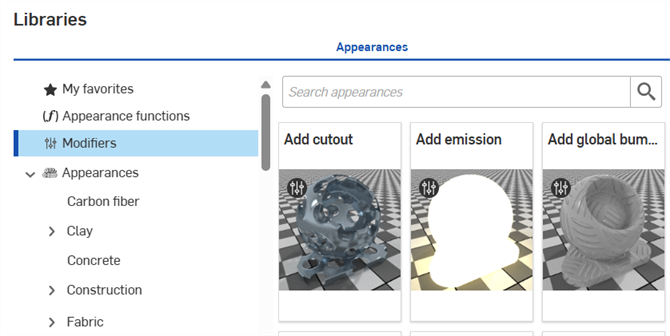
 Tabelle mit Aussehen-Modifikatoren
In der folgenden Tabelle sind alle Aussehen-Modifikatoren in der Aussehen-Bildbibliothek aufgeführt:
| Aussehen-Ordner | Aussehen-Name | Aussehen-Name, Unterüberschrift | Aussehen-Beschreibung |
| Modifikator | Abgerundete Ecken hinzufügen | [N/A] | Fügt abgerundete Ecken an den Kanten von Bauteilen hinzu, wobei das ursprüngliche Aussehen erhalten bleibt. Sie können ein neues Basis-Aussehen oder die Rundung auf verschiedene Aussehen anwenden oder auch die Parameter für Radius und Rundheit anpassen. |
| Modifikator | Glanz hinzufügen | [N/A] | Fügt einem Bauteil oder einer Fläche eine Glanzschicht hinzu, wodurch das ursprüngliche Aussehen erhalten bleibt. Sie können ein neues Basis-Aussehen und normalen Glanz anwenden und folgende Parameter anpassen: Farbstufen, Glanzrauheit, Glanzfarbe und Glanzstärke. |
| Modifikator | Volumen hinzufügen | [N/A] | Fügen Sie einem Bauteil/einer Fläche Volumeneigenschaften hinzu, wobei das ursprüngliche Aussehen erhalten bleibt. Sie können ein neues Basis-Aussehen anwenden und folgende Parameter anpassen: Absorptionskoeffizient, Richtungsabweichung und Streukoeffizient. |
| Modifikator | Aussehen-Satz (Render Studio Advanced) | [N/A] | Ermöglicht die Zuweisung einer Reihe von Aussehen zu Elementen. Das Umschalten zwischen Aussehen im Satz bietet eine schnelle und einfache Methode, um mit Aussehen-Variationen zu experimentieren. |
| Modifikator | Beidseitig | [N/A] | Fügt einer Fläche ein Aussehen für die Vorder- und Rückseite hinzu. Die Aussehen werden dünnwandig angewendet. Die Übertragung beider Aussehen muss übereinstimmen. Sie können den Ausschnittparameter anpassen, der beiden Seiten gemeinsam ist, um zu bestimmen, wo die Flächen sichtbar sind. |
| Modifikator | Globale Bump-Map hinzufügen | [N/A] | Ändern Sie ein Aussehen, indem Sie eine globale Bump-Map auf das Bauteil oder die Fläche anwenden. Die lokale Bump-Map des Basisaterialparameters wird beibehalten. |
| Modifikator | Klarlack anwenden | [N/A] | Wenn Sie Klarlack auf ein Bauteil oder eine Fläche anwenden, bleibt das ursprüngliche Aussehen erhalten. Sie können ein neues Basis-Aussehen anwenden und folgende Parameter anpassen: Farbe, ior, Unebenheiten, Reflexionsrauheit und Stärke der Beschichtung. |
| Modifikator | Farbabfall anwenden | [N/A] | Ändern Sie einen Farbabfall für ein Aussehen, um es ansichtsabhängig zu machen. Wenden Sie den Modifikator auf das Bauteil oder die Fläche an. Es gibt fünf Optionen für den Farbabfall, um das Bauteil bzw. die Fläche zu schattieren – von Farbe 1 (Blickrichtung) bis Farbe 5 (Bauteil-/Oberflächenkanten). Sie können das Basismaterial und fünf Farbparameter anpassen. |
| Modifikator | Staubschutz anwenden | [N/A] | Wen Sie eine diffuse Hülle aus Staub oder Schmutz auf ein Bauteil oder eine Fläche anwenden, bleibt das ursprüngliche Aussehen erhalten. Sie können ein neues Basis-Aussehen anwenden und folgende Parameter anpassen: Staubfarbe, Staubmenge, Unebenheiten und Staubdichte. |
| Modifikator | Partikelbeschichtung anwenden | [N/A] | Wenn Sie eine Schicht metallischer Partikel auf ein Bauteil oder eine Fläche anwenden, bleibt das ursprüngliche Aussehen erhalten. Sie können ein neues Basis-Aussehen anwenden und folgende Parameter anpassen: Partikelmenge, Partikelausrichtung, Farbe, Deckkraft der Partikel, Rauheit und Größe der Partikel. |
| Modifikator | Dünnen Film anwenden | [N/A] | Wenn Sie einen dünnen Film auf ein Bauteil oder eine Fläche anwenden, bleibt das ursprüngliche Aussehen erhalten. Sie können ein neues Basis-Aussehen sowie folgende Parameter anpassen: ior und Dicke. |
| Modifikator | Oberflächenüberblendung | [N/A] | Die Eigenschaften der Oberflächenmischung von zwei Aussehen lassen sich ändern. Wenden Sie den Modifikator auf das Bauteil oder die Fläche an. Das aktuelle Aussehen wird beibehalten. Sie können das Basismaterial (aktuelles Aussehen) anpassen und das Material (durch Anwenden eines neuen Aussehens) mischen sowie die Stärke der Mischung ändern, um das Mischmaterial zu maskieren. |
| Modifikator | Oberflächenabfall | [N/A] | Ändern Sie für die Oberflächenmischung die Eigenschaften von zwei Farbeffekten. Wenden Sie den Modifikator auf das Bauteil bzw. die Fläche an. Das aktuelle Aussehen wird beibehalten. Passen Sie das Basismaterial an (aktuelles Aussehen) und mischen Sie das Material (neues Aussehen anwenden). Mischen Sie die Neigung, die Stärke der Kante und die Stärke der Vorderseite. |
| Modifikator, Allgemein | Aufkleber-Überlagerung hinzufügen | [N/A] | Verändern Sie ein Aussehen, indem Sie eine dielektrische Aufkleber-Überlagerung auf das Bauteil bzw. die Fläche anwenden. Erfordert eine Maskenbilddatei für die Aufkleberdefinition. |
| Modifikator, Beleuchtung | Add emission | [N/A] | Ändern Sie ein Aussehen, indem Sie eine Lichtemission anwenden, wobei das grundlegende Aussehen erhalten bleibt. Sie können ein neues Basis-Aussehen anwenden und folgende die Parameter anpassen: Intensität, Farbe, Emissionseinheit und Einheitenskala. |
| Modifikator, Beleuchtung | Thermische Emission hinzufügen | [N/A] | Ein Aussehen lässt sich ändern, indem Sie eine thermische Wärmeabstrahlung auf das Bauteil oder die Fläche anwenden. Sie können das Basismaterial, die Intensität, die Temperatur (ändert die Farbe) und die Einheit für die Emissionsparameter anpassen. |
| Modifikator, Metall | Dünne Metallbeschichtung auftragen | [N/A] | Wenn Sie eine Metallbeschichtung auf ein Bauteil oder eine Fläche anwenden, bleibt das ursprüngliche Aussehen erhalten. Sie können folgende Parameter anpassen: Reflexionsfarbe, Unebenheiten, Reflexionsrauheit und Reflexionsstärke. |
| Modifikator, Kunststoff>Netz, Metall>Netz | Ausschnitt hinzufügen | [N/A] | Sie können ein Aussehen ändern, indem Sie Ausschnitte auf das Bauteil bzw. die Fläche auftragen. Damit wird ein dünnwandiger Materialauftrag erzwungen, z. B. zum Modellieren von Blättern, Gras oder Zäunen. Erfordert eine Maskenbilddatei für die Ausschnittsdefinition. |