Enterprise Settings - Arena

Only available for
Administration settings to configure the Onshape connection with Arena so that Onshape and Arena can successfully pass information between the two applications. For more information see The Onshape Arena Connection.
To navigate to your Arena settings in Onshape, click on your Account user icon ( ) in the top right corner of your Onshape window. This opens a dropdown menu. Click Company/Classroom/Enterprise settings.
Click Arena in the list on the left side of the page:
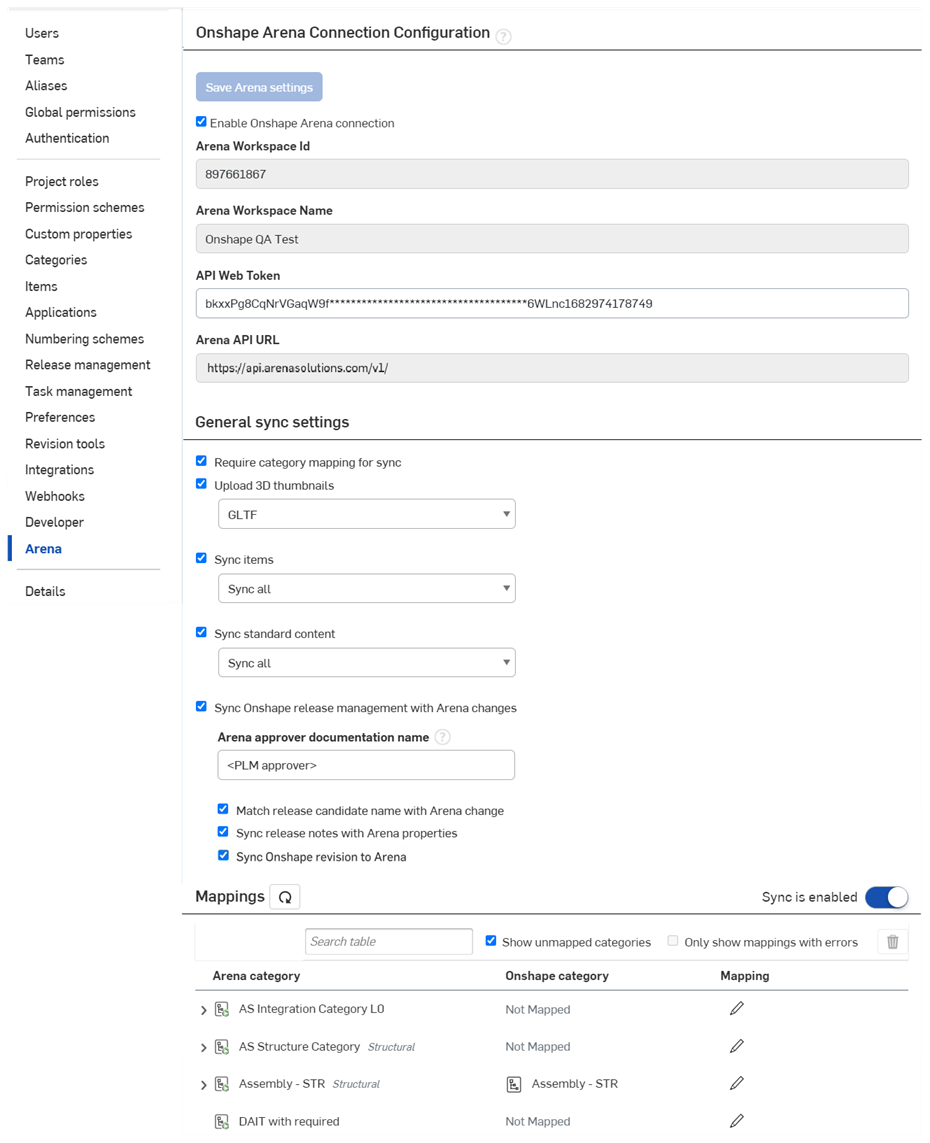
 Onshape Arena Connection Configuration
-
Save Arena settings - If any Arena page settings are changed, this button must be pressed to have those changes take effect. This button is also duplicated at the bottom of the Arena settings page.
-
Enable Onshape Arena connection - Check to enable the connection between Onshape and Arena.
-
Arena Workspace ID - The Arena workspace to be configured for connection to your Onshape Enterprise. This is not the same as the user-visible name, but the internal ID used by Arena. For help locating this ID contact Arena Support.
-
Arena Workspace Name - Once all other data is verified, this field is populated upon successful connection between Onshape and Arena once the Save changes button is clicked.
-
API Web Token - Obtained upon request from Arena support. The web token associated with an Arena User ID that is also provided by Arena support. The User ID must be a valid Arena user that is not being used by anyone to log in to the Arena UI.
-
Arena API URL - Obtained from Arena support. See Configuring Arena and Onshape for the steps to obtain an Arena API URL.
General Sync settings
-
Require category mapping for sync - When checked, any unmapped categories do not sync to Arena. When unchecked, unmapped categories sync to Arena, and are placed in the “uncategorized” category in Arena.
-
Upload 3d thumbnails - When checked, 3D GLTF or PVZ thumbnails are uploaded to Arena. When unchecked, 3D GLTF or PVZ thumbnails are not uploaded to Arena.
-
Sync items - If unchecked, no Items are synced. If checked, use the dropdown to:
-
Sync only quantities - If Items exists in the Onshape BOM table, only their quantities are updated in Arena when the BOM is synced,
On first BOM sync, all item properties are sent to Arena. In subsequent syncs, only quantities are updated.
-
Sync all - If Items exists in the Onshape BOM table, all their metadata is updated in Arena (Arena properties) when the BOM is synced.
-
-
Sync standard content - If unchecked, Standard content is not synced. If checked, use the dropdown to:
-
Sync only quantities - If Standard content exists in the Onshape BOM table, only its quantities are updated in Arena when the BOM is synced,
On first BOM sync, all standard content properties are sent to Arena. In subsequent syncs, only quantities are updated.
-
Sync all - If Standard content exists in the Onshape BOM table, all its metadata is updated in Arena (Arena properties) when the BOM is synced.
-
-
Sync Onshape release management with Arena changes - If checked, an Onshape Release candidate and associated parts, Assemblies, and drawings are synced with an open and unlocked Arena Change. The Arena change then drives the approval process, and once approved in Arena, notification is sent to Onshape and the Onshape Release candidate is approved.
-
Arena approver documentation name - The name that is shown in all Arena-synced Release candidates and in the Approver field on the Release candidate dialog.
-
Match release candidate name with Arena change - When checked, if an Arena Change is selected in the Release candidate dialog in Onshape, the Arena Change Number automatically populates the Release name field and the Release name field becomes read only. This is useful if you want to see the Arena change number in the Onshape version graph.
Leave this option unchecked to require the user to manually enter a Release name during Release candidate creation.
-
Sync release notes with Arena properties - When checked, if an Arena Change is selected in the Release candidate dialog in Onshape, the Title of the Arena Change is automatically copied into the Onshape Release notes field. The Release notes field remains editable so the user can change or augment the note.
Leave this option unchecked to require the user to manually enter Release notes during Release candidate creation.
-
Sync Onshape revision to Arena - Syncs the revision generated by Onshape to Arena. See Sync Onshape revision to Arena for more information.
-
-
Sync is enabled / Sync is disabled - When sync is enabled, mappings are enabled. When sync is disabled, mappings are disabled.
Use the Disable sync switch to temporarily turn off sync. This is useful when verifying your Onshape Arena connection configuration settings, without committing to any actual data sync.
Mappings
Displays a list of all Onshape categories mapped to Arena categories.
-
Refresh mappings button (
 )- Refreshes the mappings between Onshape and Arena.
 -
Search table - Enter search terms and press Enter to search for a category mapping in the table.
-
Show unmapped categories - When checked, all unmapped categories are visible in the table. Uncheck to hide these categories.
-
Only show mappings with errors - When checked, only mappings with errors are visible in the table. Keep unchecked to display both mappings with and without errors.
-
Delete button (
 ) - Deletes any mappings that are selected in the table.
 -
Arena category - This column lists all the categories defined in Arena. This list is read from Arena as the page loads, as long as the Sync is enabled toggle is enabled (blue).
-
Onshape category - This column indicates the name of the category as defined in Onshape. If the Arena category has not been mapped to an Onshape category, Not Mapped appears in that column instead of the category name.
-
Mapping - This column displays either an informative message or a pencil icon to allow the Administrator to create or edit the mapping.